


Wallpapers HD - Backgrounds 4K
4.83.14K Reviews
App Specs
- Version
- 3.17.6
- Updated On
- License
- Free
- Downloads
- 50,000,000+
- Developer
- TarrySoft
- Categories
- Personalization
- Platform
- Android, iOS
Screenshots







 Analysis by AppCompare
I usually start looking for a new phone background when the one I have stops feeling right: it may be too busy behind app icons, too dark outdoors, or simply something I have seen too often. Wallpapers HD - Backgrounds 4K is a personalization app from TarrySoft that makes browsing for a replacement feel approachable rather than like a long hunt through unrelated images. I would consider it when I want fresh visual choices without having to create a design myself.
Choosing a wallpaper that works beyond the preview
My first step is to decide what the screen needs, not just what image looks striking in a thumbnail. A detailed landscape can be lovely on its own but compete with icons and widgets; a quieter image may make the phone easier to scan. I use the category browsing to get a sense of the available styles, then narrow the choice with search when I have a subject in mind. That combination is more useful than endlessly scrolling one general feed.
For example, if I want a calm home screen, I might look for a minimal or nature-inspired image and check whether its focal point leaves open space where my icons sit. If I am choosing a lock-screen image instead, a strong central subject may be more appealing. Thinking about the destination before saving helps avoid the familiar cycle of picking a beautiful picture, setting it, and changing it again because it makes the screen feel crowded.
From browsing to a finished screen
The practical workflow is straightforward: browse a category or search, open an image that catches my eye, inspect its composition, then crop it for the phone before setting it. The crop step matters more than it first appears. A tall image can still lose an important detail when adjusted to a particular display, so I take a moment to move the framing rather than accepting the first fit. That small check can make the difference between a wallpaper that looks intentional and one that feels awkwardly cut off.
The collection’s HD and 4K options are appealing when I care about crisp detail, but resolution alone does not make every image a good choice. On a small screen, fine textures may barely register, while high contrast can remain noticeable even when icons cover part of the background. I judge the actual preview on my phone and think about how it will look with the usual home-screen layout, rather than choosing only by the sharpness label.
Daily Wallpaper offers a different route for people who would rather not choose every time. I would use automatic changes when I want variety and do not mind handing over that decision; when I have a carefully arranged home screen, I would keep a deliberate selection instead. A changing picture can alter the feel of the whole interface, and a background that works beautifully one day may be distracting the next. Treating the feature as a convenience rather than a requirement makes it easier to decide whether it suits your habits.
Where the app fits in a real routine
Imagine checking your phone before work and noticing that the current background is hard to read in bright light. I would open the app during a short break, search for a simpler look, preview a few candidates, and adjust the crop before applying one. If the first choice puts a bright patch behind the clock or icons, I would go back and compare another rather than forcing it to work. The useful outcome is not merely a prettier image; it is a screen that feels more comfortable to use throughout the day.
Worth Reading Before You Choose

Baby Panda World Brings Quick Play to Modern Phones, but Its Game Library Feels Busy

ESPN’s Live Game View Makes Following Close Games Easier

QuizzLand Review: A Good Fit for Short Trivia Breaks, Not Every Player

Basketball Stars: Multiplayer Is Fast, but Can It Recover When Matches Go Wrong?

WEBTOON Turns Phone Updates Into a Better Reading Routine

Link to Windows Runs on Shared Habits, Not Social Feeds
Likes and similar-image suggestions can help when I am not sure how to describe the style I want. I can mark a design that feels close and use the recommendations as a trail toward related choices. That is handy for discovery, although it can also keep me circling around one visual mood. When that happens, I switch categories or search for a contrasting subject so the suggestions do not decide my taste for me.
User-submitted designs add a sense of discovery that a fixed, tightly curated gallery may not offer. I enjoy the possibility of finding something less familiar among community uploads, but a large, changing collection can also feel less consistent than choosing from a small set of hand-picked images. If I want a predictable look, I spend more time judging individual previews; if I am browsing for inspiration, the variety is part of the appeal.
The handoff from image to phone
Picking an image is only half the job. I still need to decide where it belongs, how it should be framed, and whether it remains legible once the screen is populated with icons and widgets. I recommend checking the crop before applying it and looking at the result on the actual home or lock screen. A striking preview can be a poor everyday background if the subject lands underneath interface elements or if the colors make text hard to distinguish.
Saving or downloading is also a point where the experience may feel less seamless, since ads can appear around that action. The app is free to install, but it offers in-app purchases, with individual items priced from $0.99 to $99.99. I would try the free experience first and decide based on how often I use it and whether the interruptions bother me, rather than paying simply because a premium option exists. The age rating is Everyone, and the app has a 4.7 average from around 378,000 ratings, with over 50 million installs.
How it compares with other ways to personalize
Compared with choosing one of the wallpapers already on a phone, this app is better suited to someone who wants a broader stream of styles and enjoys browsing for a particular mood. A built-in background is quicker and avoids opening another app, so I would stick with that if I rarely change my screen or prefer a restrained selection. Compared with searching the web for individual images, a dedicated wallpaper app keeps browsing and phone-oriented cropping in one place, though it still asks me to judge each image for fit rather than assuming every high-resolution picture will work well.
It is also different from making a background in a design or photo-editing app. Those tools are the better choice if I need exact colors, custom text, a personal photograph, or precise control over a composition. Here, the strength is discovery and convenience, not turning a wallpaper into a fully bespoke project. I see it as a source of ready-made options rather than a replacement for a creative editor.
First Impressions
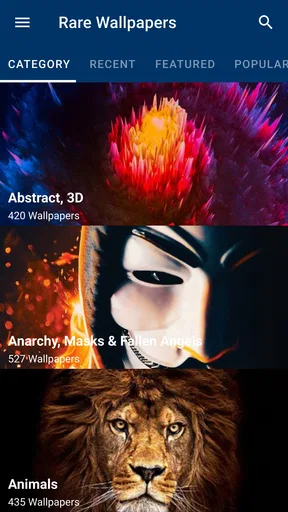
As soon as I opened Wallpapers HD - Backgrounds 4K, I was greeted with a sleek and easy-to-navigate interface. The design is simple, which is great because I hate apps that feel cluttered. The homepage showcases a variety of categories, from nature and abstract to tech and minimalism. Honestly, it's a feast for the eyes!
Exploring the Features
The app offers an impressive collection of 4K and HD wallpapers. I was amazed by the quality of the images. They look crisp and vibrant, making my phone screen pop. Plus, there's a handy search bar, which makes finding specific themes or styles a breeze. If you know what you’re looking for, this feature is your best friend.
One thing that stood out to me was the "Daily Wallpaper" feature. It's like a surprise every day! You can set it to automatically update your wallpaper, so your screen always looks fresh without you having to lift a finger. If you're like me and love variety, this feature is a game-changer.
Customization and Usability
Beyond just picking a wallpaper, the app also allows some customization. You can crop and set the wallpaper according to your screen's specific dimensions. I found this particularly useful because not all wallpapers fit perfectly, and I like having control over how they appear on my screen.
Usability-wise, Wallpapers HD - Backgrounds 4K is smooth and responsive. I didn't experience any lag or crashes, which is always a relief. The app is quick to load images, which is essential when you're browsing through hundreds of options.
Community and Interaction
One cool aspect of this app is the community involvement. Users can upload their own creations, which means the collection is always growing and evolving. I love scrolling through user-submitted wallpapers; it feels like a treasure hunt for unique and creative designs.
Plus, you can "like" wallpapers, and the app intelligently suggests similar images based on your likes. If you've ever fallen down a rabbit hole of recommendations, you'll find this feature both addictive and delightful.
Ad Experience and Monetization
Now, let's talk about ads. We all know they're necessary for free apps, but they can be annoying if overdone. Fortunately, the ads in Wallpapers HD - Backgrounds 4K are fairly unobtrusive. They mostly appear when you save or download a wallpaper, which is a reasonable trade-off for such high-quality content.
If ads aren’t your thing, there’s an option to upgrade to a premium version. This not only removes ads but also unlocks exclusive wallpapers. If you find yourself using this app often, the premium version might be worth considering.
Final Thoughts
Overall, Wallpapers HD - Backgrounds 4K is a fantastic app for anyone looking to spice up their phone's look. With its vast collection of stunning wallpapers, user-friendly interface, and engaging community features, it's a must-try for wallpaper enthusiasts. Whether you're into nature landscapes or abstract art, you're bound to find something that suits your taste.
If you're ready to give your phone a fresh new vibe, go ahead and try out Wallpapers HD - Backgrounds 4K. It might just become your go-to app for all your wallpaper needs!
Who will get the most from it
I think this app makes the most sense for people who change their background often, enjoy browsing visual styles, or want a low-effort way to make a familiar phone feel more personal. The wide selection and recommendations are useful when I have a mood in mind but no exact image, while search is better when I already know the subject. It can also suit someone who wants to try a different look without learning a design tool.
I would be less enthusiastic about it for someone who wants one carefully controlled, distraction-free image and rarely changes it. In that case, the phone’s own wallpaper picker may be faster and quieter. The same goes for anyone who needs a very specific personal design: a family photo, custom typography, exact brand colors, or a composition tailored around a widget layout. A photo editor gives more control for those jobs.
Small choices that improve the result
One useful habit is to browse with the status bar, clock, and icon layout in mind rather than judging a wallpaper as a standalone picture. I look for a relatively calm area where interface details will sit, then use the crop to protect the part of the image that gives it character. This is especially helpful with landscapes, where a beautiful horizon can disappear if the framing is too tight.
I also treat likes as a way to explore, not as a final filter. Recommendations can surface related images, but repeatedly liking one type of composition may narrow what I see. When I want a genuinely different feel, I deliberately search another category instead of continuing down the suggested path. That makes the discovery process more useful and less repetitive.
For automatic changes, I would first choose images that work in several lighting and layout situations, rather than relying on a single dramatic design. A bright, detailed background may look great in a quick preview but become tiring behind icons. If I prefer consistency, I would turn to a single manually selected image; if I welcome a little surprise and accept occasional mismatches, Daily Wallpaper is the more relaxed option.
Practical limits to keep in mind
The main trade-off is that browsing a large collection takes judgment. The app can help me find images, but it cannot know which colors will clash with my icon arrangement or which crop will feel balanced on my particular screen. I still need to preview and adjust instead of assuming that a high-resolution label guarantees a perfect fit.
There is also a difference between a rich gallery and a curated one. Community uploads make discovery more varied, but users who want every image to follow a narrow visual standard may prefer a smaller editorial collection. Ads around saving or downloading can interrupt the final handoff, too. For occasional changes, that may be an acceptable exchange for free access; for frequent browsing, it is worth noticing how that friction affects your routine before considering a purchase.
The current version is 3.17.6 and it runs on Android 6.0 or later. I would check that requirement before installing on an older device, and I would keep expectations focused on phone personalization rather than advanced image editing. Those details make it easier to decide whether the app fits your device and the amount of control you want.
My recommendation after trying the workflow
What I like most is the path from an idea to a usable background: categories or search help me find a direction, previews let me compare, and cropping gives me a chance to make the image fit the screen instead of accepting an awkward cut. The user-contributed gallery and similar-image suggestions are especially enjoyable when I am browsing without a fixed plan. They make the app feel more exploratory than a basic folder of preset backgrounds.
My reservation is that discovery does not remove the need to make a careful choice. The image still has to work with the phone’s interface, and ads can appear at the moment I want to save it. I would recommend giving it a try if you enjoy changing your screen and want plenty of styles to explore; I would choose a built-in wallpaper or an editing app instead if speed, strict curation, or exact creative control matters more. Overall, it is a handy personalization app when the goal is to find a fresh look and make it fit everyday use.
Pros
- High-resolution images enhance device appearance.
- Wide variety of categories to suit all tastes.
- User-friendly interface for easy navigation.
- Regular updates keep content fresh and exciting.
- Option to save favorites for quick access.
Cons
- Contains ads that can disrupt user experience.
- Some wallpapers require in-app purchases.
- Limited customization options for images.
- Offline access is not available for all features.
- Large downloads can consume significant data.
FAQs for Wallpapers HD - Backgrounds 4K
What features does Wallpapers HD - Backgrounds 4K offer?
Wallpapers HD - Backgrounds 4K provides a vast collection of high-quality wallpapers in HD and 4K resolutions. It offers categories ranging from nature and technology to abstract art and more. The app includes daily updates, customization options, and an easy-to-use interface, allowing users to personalize their device’s appearance effortlessly.
How often are new wallpapers added to the app?
The app is updated daily with fresh wallpapers, ensuring that users always have access to the latest and most popular designs. This consistent update schedule helps keep your device's background dynamic and in line with current trends, offering a wide variety of choices tailored to different tastes.
Is Wallpapers HD - Backgrounds 4K free to use?
Yes, Wallpapers HD - Backgrounds 4K is free to download and use. However, it may offer in-app purchases or ads to support the developers. Users can choose to unlock additional features or remove ads through these purchases, enhancing their overall experience with the app.
Does the app require an internet connection to function?
An internet connection is needed to download new wallpapers and receive updates. However, once wallpapers are downloaded, they can be accessed offline. This feature allows users to enjoy their favorite backgrounds without needing to be connected to the internet constantly.
Are there customization options available within the app?
Yes, the app provides various customization options. Users can crop, adjust, and apply filters to wallpapers to suit their preferences. This flexibility allows for a personalized touch, enabling users to create a unique look for their device by modifying standard wallpapers to better fit their style.


